PHribbon makes the input process really easy. Since v7.01 buttons on the main menu guide to input screens by RICS categories.
Materials for walls, roofs and floors come from your U-values. Selecting a material brings up a list of matches from the built-in library and the final selection is up to you. Quantities are from your PHPP, and there is an optional area correction for a more accurate volume of material in each layer. It remembers the names you use for materials and offers the same EPD when you use that name again. If you want to change a material, a checkbox allows you to change a material, keeping the quantities.
Main menu and 4 typical input screen styles:


Some screens have buttons to filter the data and quickly jump similar categories of data. Each category near the title filters the list and moves to the next available row in that section of the spreadsheet:


Coloured “heat map” results, the output table is coloured by value redder figures are higher CO2 ,green figures represent storage of CO2. Each data result is fully transparent, formulas/figures can be inspected. 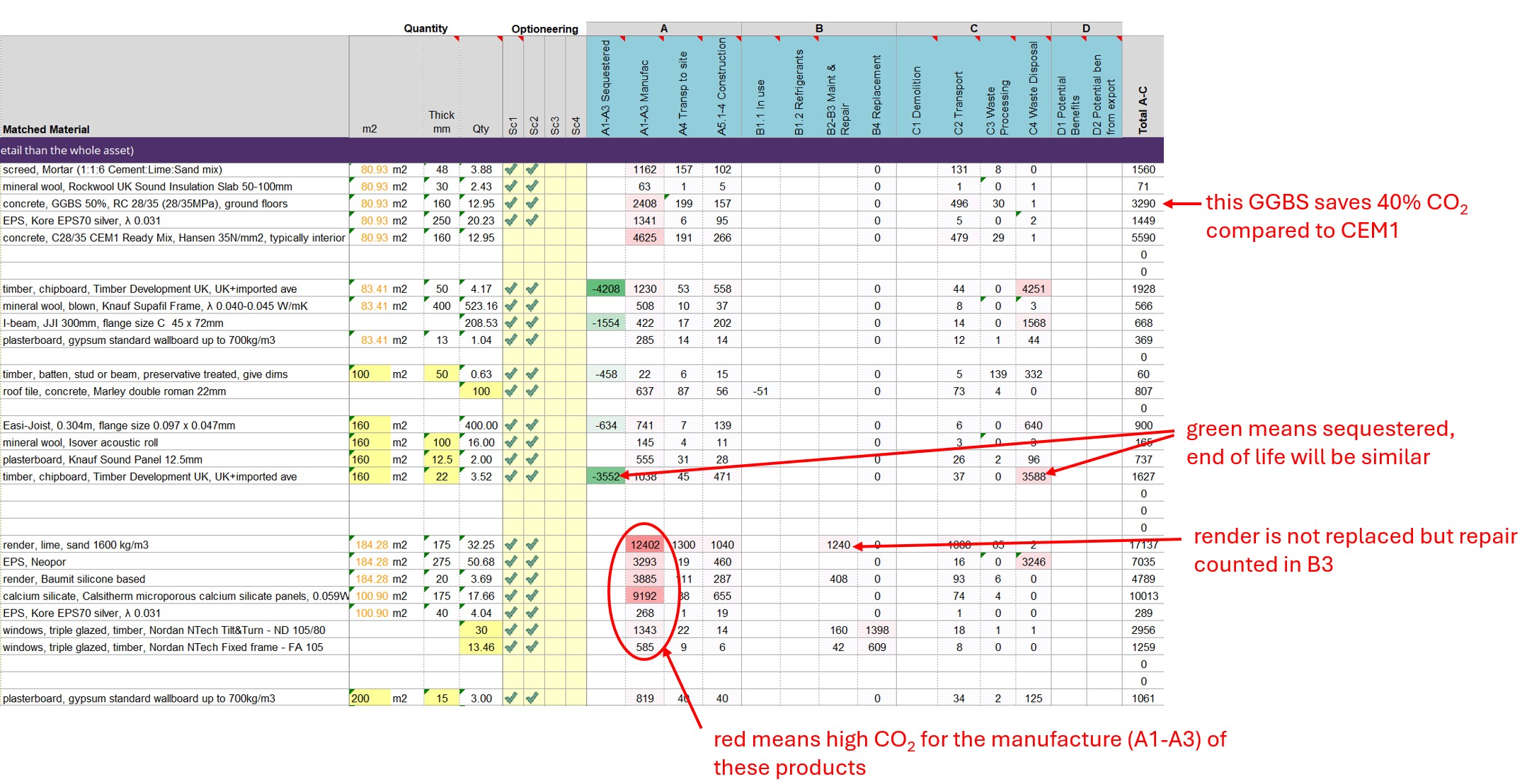
Graphs show in detail the breakdown of embodied carbon (left) and the combined graph of embodied and operational carbon throughout the 60 year reference study period (a theoretical time frame for comparison).

The main results tables below show

There are further advantages within the results that are less obvious:
The free version has half of the features below, the full version has a mode advanced climate button and four new shading tools.


PHribbon exports into Mark Siddall’s Daylight Calculator spreadsheet, which calculates the daylight factor. There are several sheets that contribute to a final results sheet, shown below. For more information about the tool see our Daylight Guidance

A useful part of the “Retrofit Costs” module is Improvement Option Evaluation (IOE) for Retrofit Coordinators. PAS2035 requires IOE to help guide the selection of measures in a retrofit. Energy calcs must start with the unimproved house, try out each new measure they might use, then remove it. After listing the simple payback and carbon cost effectiveness of those results, measures can be implemented in potential packages.
PHribbon Improvement Option Evaluation helps by automating the entire process within PHPP. For a whole house retrofit a lot of measures are needed so this can save a lot of time. It works by:
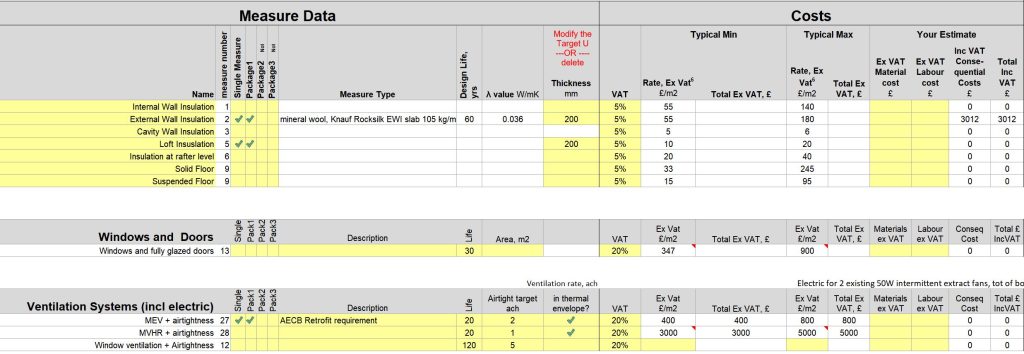
There is also a list for Consequential Costs – where specific circumstances could significantly increase the cost of a particular measure. This feeds back into the main table:
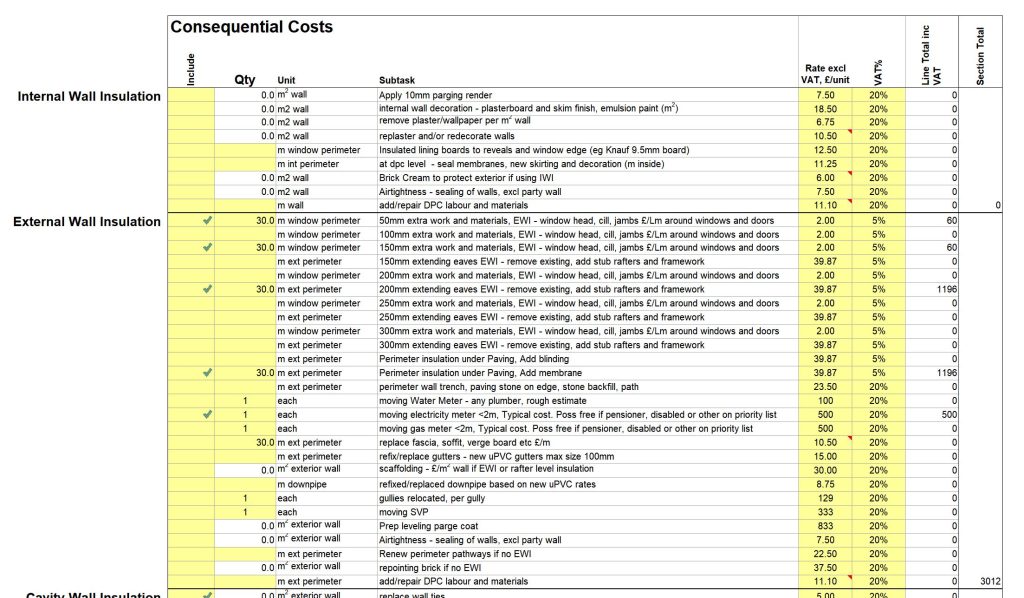
Estimating costs for a retrofit is complex. From v7.09 PHribbon is moving over from reporting Net Present Value to cumulative costs in today’s money. Costs change over time and also vary by region and by contractor. Accurate information must be obtained through quotes. PHribbon helps by


PHribbon is written to align with the RICS 2nd Edition (2023) Professional Statement on Whole Life Carbon. This is based on EN 15978 and is required by RIBA, CIBSE and IStructE. It is suitable for the RIBA 2030 Challenge v2, LETI and has estimates for the pilot UK Net Zero Carbon Building Standard (UKNZCBS). There are also some local authorities that require Embodied Carbon calculations, such as London (London Plan 2021), South Hams (Totnes).
PHribbon calculates Whole Life Carbon, which combines the embodied CO2 from materials with the operational CO2 from running the building. It is cradle to grave, covering stages A-C (and most module D info) :
Module A, A1-A3 Manufacture including A4 Transport to site and A5 Construction including A5.1 Pre-construction demolition and A5.3 Construction waste.
Module B, Use of the building including B4 Replacement
Module C, End of Life of the building including RICS estimates where this info is missing
Module D1 where info is provided in the EPD (RICS est for missing info is not yet implemented) and Module D2 calculation of exports from PV or other renewables.
The AECB Carbon Calculator works in a similar way except that it doesn’t link to PHPP. It still calculates both embodied and operational carbon as long as you can provide figures from your energy software (e.g. Full SAP).

Minimum Requirements
No special PHPP is needed. PHribbon is compatible with
PHribbon full version includes the “Whole Life Carbon” module, “Build PHPP” module, and the first year’s subscription. The subscription fee is what makes it possible for us to keep it up to date, mostly just the Whole Life Carbon module.
New EPDs are continuously being brought out for new products and to replace old ones that expire after 5 years. Each year new Future Energy Scenarios are brought out from NESO and the Government brings out new CO2 reporting data. It’s quite a process keeping PHribbon up to date. The same Dropbox or Sharepoint folder that you originally got your first version is where you will find updated versions. It is usually only one file, PHribbon.xlsm, that changes.
If you have not added any of your own custom data then you only have to replace your existing PHribbon.xlsm with the updated one, you don’t have to reinstall. If you do have custom data, open “Update.xlsm”, one of the files in the package and follow the guidance.
The total package price is £250 ex VAT for non members and this includes a £70 ex VAT purchase of an annual recurring subscription fee. The subscription fee will be payable annually on the purchase anniversary.
The AECB members price is £200 ex VAT which includes a discounted subscription fee at £50 ex VAT also payable annually.
The price of the software includes a manual, which is also a button on the right hand side of the installed ribbon, and some online training videos through a link next to your licence key on the Install tab of PHribbon.xlsm .
Its a bit of both. Its a spreadsheet with software built into it which runs alongside your PHPP. As with most software the licence key is specific to a computer and checks the identity of that computer when it starts.
Your payment confirmation email will ask for a security code which you get from a downloaded spreadsheet. Pressing the button in that spreadsheet just reads a unique code on your computer, it makes no changes whatsoever. If you change your computer in the future you can ask for a new licence key free of charge.
The software is distributed by Dropbox or Sharepoint and updated every few months. You’ll be emailed instructions of how to copy it to your own folder. Enter the licence key at the top of the Install tab then follow the instructions below it. This explains how to safely enable macros, PC and Mac instructions. (Macros are already part of PHPP v9 and v10 variants version by the Passivhaus Institute.)
By using this software you agree to these terms :